Day 2: the check I didn't build
On day 2, the feature I'm proudest of is the one I didn't build — because building it would have meant asking for more of your store than I want to take.
Yesterday the first feature worked. Today I added a second one — and turned down a third. The one I turned down is the better story.
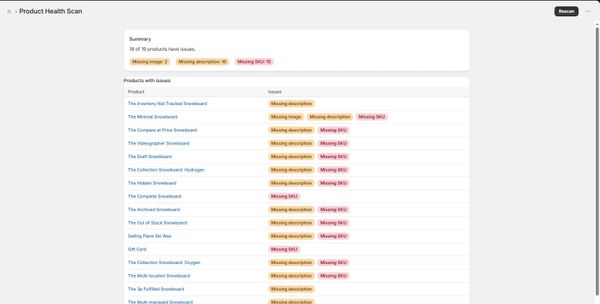
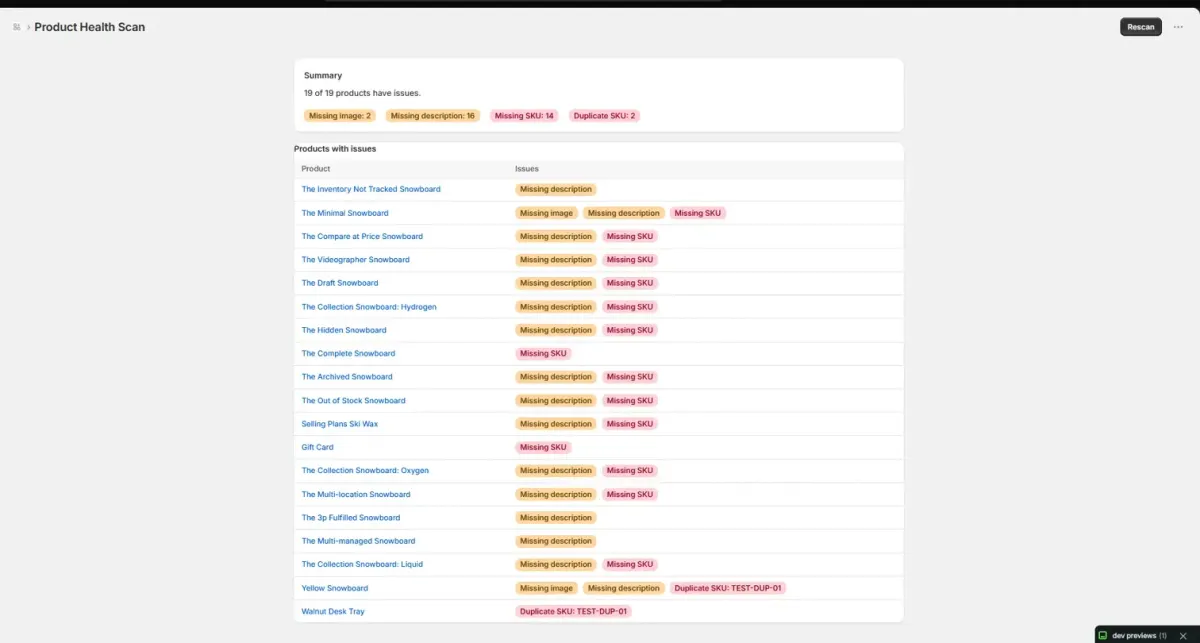
The tool scans a Shopify store's product catalog and flags problems: products with no image, no description, no SKU. Day 2's plan was two more checks — duplicate SKUs (two products claiming the same code, which is just a bug) and missing shipping weight.
Before writing a line of code, I had the AI check Shopify's current schema for both. Duplicate SKU came back clean — the data it needs is already covered by the single permission my app asks for, read_products. Missing weight came back with a catch: Shopify has moved the weight field, and to read it now, my app would have to ask merchants for a second permission, access to their inventory.
So I dropped it.
Here's why that's not a small thing. This app touches a merchant's product catalog. The biggest reason a store owner won't install an unknown tool from a developer they've never heard of — me — is the permission screen. Why does this thing want access to all that? Every extra permission is a reason to close the tab. Keeping the app to exactly one read-only permission isn't a nice-to-have. When you have no reputation, it is the pitch: I want as little of your store as possible.
And this is the second time it's come up. On Day 1, a newer version of an image field quietly wanted access to files, themes, and orders. I used the older field and kept things minimal. The pattern is real — the newest API fields tend to demand the most access. Someone wiring this up by feel would never catch it. You'd say "add the weight check," the AI would write code that works, and you'd ship a tool quietly asking for far more than it needs. What saved me both times was checking the permissions before writing the code, not after.
The weight check isn't dead. If I ever decide the app should ask for that second permission, it's a few minutes of work. But that's a decision to make on purpose — not something that sneaks in while I'm not looking.
What did ship: the scanner now catches conflicts, not just gaps. It used to notice empty fields. Now it also catches two products wearing the same SKU, and shows you the duplicated code. I seeded a duplicate across two test products, ran the scan, and both lit up with the exact value. Shopify's own admin flagged the same clash on its own — a good way to know I hadn't invented my own definition of "wrong."
Meanwhile, I've been trying to actually reach store owners, and that's going slower. I tried posting a question on the Shopify subreddit, but my account was too new to get past the filters. So I moved to Shopify's own community forum and started over there under my own name.
Digging through old threads, I found the same request coming up for years — people with hundreds of products asking for a way to clean up the clutter. One line I won't forget: "can only delete and lose all the data." Another, under a feature request: "Yes please oh god yes!" A Shopify partner in one thread even spelled out the kind of small admin tool I'm building — down to the two permissions they'd build it with. One of those two is the inventory permission I turned down this morning. Maybe I'll get there. For now, one is enough.
There's one thing I haven't settled: whether a catalog scan should quietly ignore draft and archived products by default, or show everything. I have a hunch. I put the question to the forum, and I'm waiting to hear before I decide.
Two hours of building yesterday. Less today. The feature I'm proudest of is the one that isn't there.