Day 1: the first feature works (2 hours of me, 19 minutes of AI)
Day 1 of building a Shopify app as a non-developer: two hours of my time, nineteen minutes of the AI's, one permission landmine, and a bug fixed in 3 minutes 41 seconds.
At 12:33 this morning, I hit publish on a post saying I'm not a developer. By dinnertime, the first feature of my first Shopify app was working.
Here's the honest time sheet for day 1: about two hours of my hands-on time, and roughly nineteen minutes of the AI actually working. The rest of the half-day was me reading, deciding, and double-checking — which, it turns out, is the actual job.
(The stack, for the curious: Claude Code, Shopify's official dev MCP, and Shopify's React Router app template.)
What I'm building
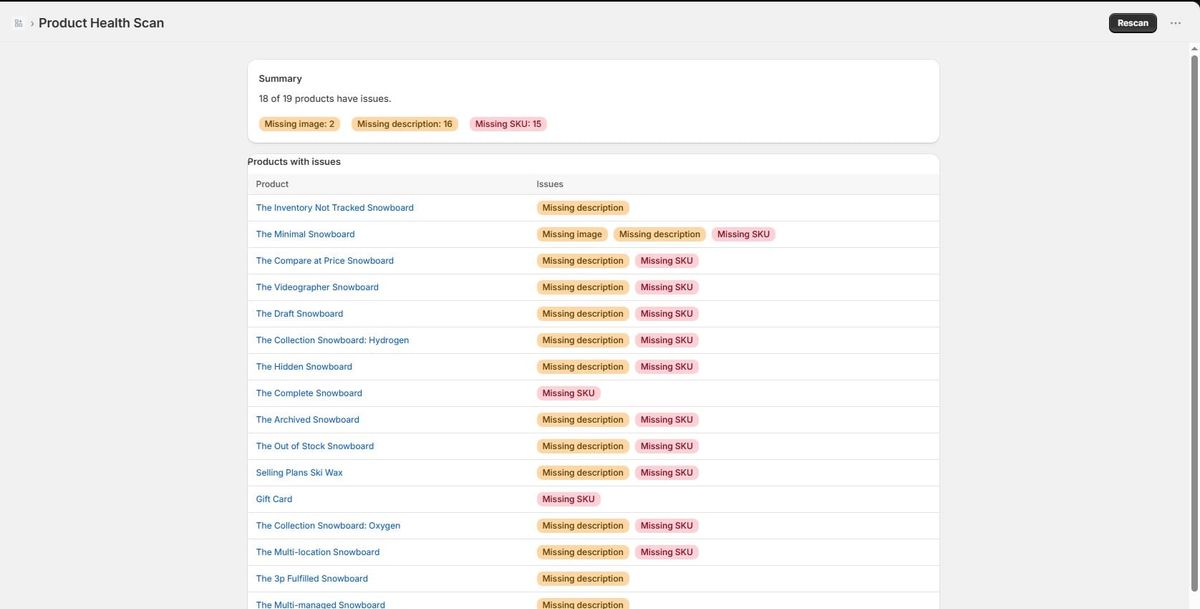
A small admin tool for Shopify merchants: it scans your product catalog and flags what's missing — products without images, without descriptions, without SKUs. Boring on purpose. It doesn't even have a name yet.
I set one rule before any code existed: the app is read-only. It can look at your products; it cannot touch them. A scan tool that could silently edit your store isn't a scan tool. It's a liability.
The permission landmine
This is the part that genuinely surprised me.
Before writing a single line, the AI validated the planned query against Shopify's live API schema (Shopify ships an official tool that lets AI assistants do exactly this). It flagged something I would never have caught: the modern field for fetching a product's image, featuredMedia, quietly drags in a chain of extra permissions. Files. Themes. Even orders.
My read-only rule would have died before the first commit — and I wouldn't have known until a merchant stared at an install screen asking why a catalog scanner wants access to their orders.
The fix: use the older-but-still-valid featuredImage field instead. The app now requests exactly one permission — the entire permission config is one line:
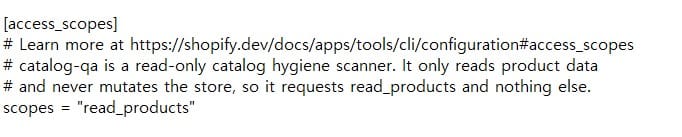
The non-developer takeaway: the dangerous part of AI-built software isn't the code you can see. It's the defaults you can't. I couldn't have caught this. The AI, checking live docs before writing code, did.
The first real bug: 3 minutes 41 seconds
Then it happened. I clicked "Scan" and got a blank screen. No error message. Nothing.
The division of labor was clear. My job: describe the symptom precisely — what I clicked, what I expected, what I actually saw. The AI's job: instead of guessing, it opened the framework's source code installed on my machine and read it. The cause: my scan page and its parent layout share the same URL, and my data request was landing on the parent's loader instead of my page's — unless the request carries a bare ?index parameter. A framework quirk, documented in exactly the kind of place I would never look.
One line fixed it, plus a fallback that makes a blank screen structurally impossible from now on.
Time from "here's the symptom" to fixed: 3 minutes and 41 seconds. I've spent longer than that reading forum threads about bugs I didn't even have.
What "works" actually means
Full disclosure: all of this ran against a development store — Shopify's sample catalog of 18 snowboards, plus one control product I created by hand with every field filled in correctly. The scan flagged 18 of 19, correctly left the control product alone, and gives each product its own combination of flags rather than painting everything red.
That's verification, not validation. Zero real merchants have touched this. Whether anyone actually needs it is still a completely open question — and the harder half of this whole project.
A question I can't code my way out of
Day 1 also produced the first real product decision, and it isn't a coding problem: the scan currently flags draft, archived, and hidden products too. Should a catalog health tool care about products customers can't even see? Filter them out? Keep them, with a status column?
If you run a store — or just have opinions — I'd honestly like to hear. Reply to this email, or leave a comment.
Next
Day 2: more checks — inventory, weight, product type, duplicate SKUs — and deciding which of them earn a spot. Then the part I'm actually nervous about: deploying this thing, and Shopify's app review.
If you want the next log in your inbox, subscribe below. It's free, and I only send when something actually happened.